【簡単‼】Unity Projectフォルダ自動色分け 【導入するだけで自動分類】 【Noatti FolderManager】

  • ダウンロード商品
    通常版
    ¥ 300
  • ダウンロード商品
    支援版(中身は変わりません)
    ¥ 500

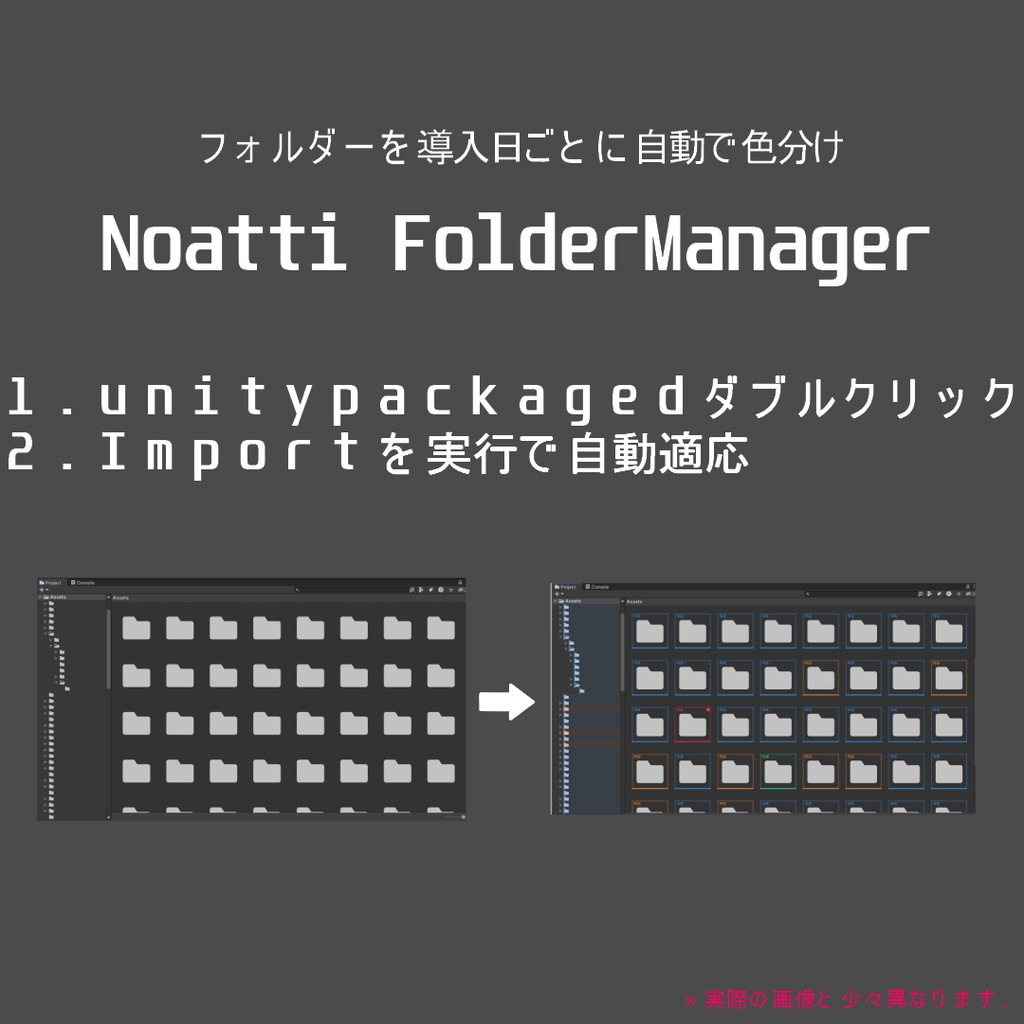
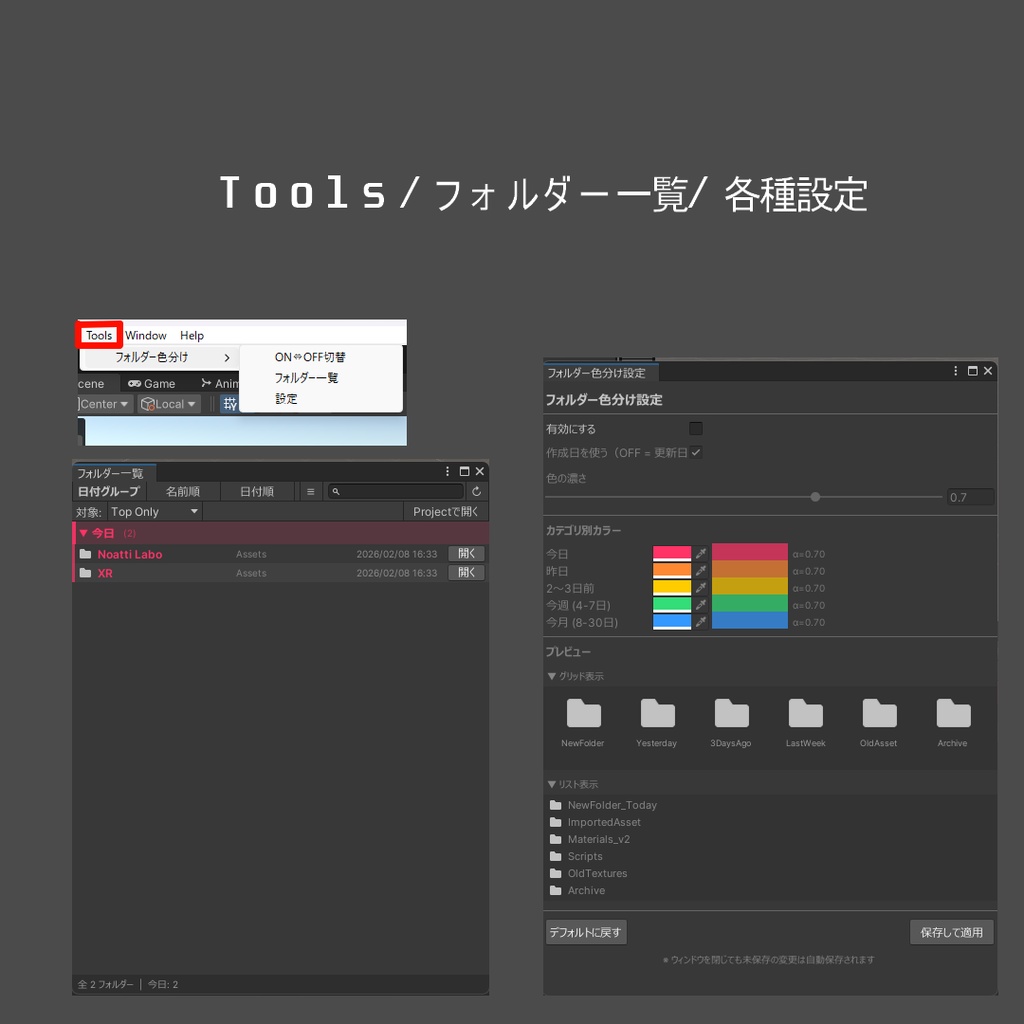
━━━━━━━━━━━━━━━━━━━━ Noatti FolderManager ━━━━━━━━━━━━━━━━━━━━ 「今導入したフォルダーどこだろうと迷うことがありませんか?」 もう迷う必要はありません。 Noatti FolderManager は、 Unity の Project ウィンドウ内フォルダーを 導入日ごとに自動で色分け表示する Editor 拡張ツールです。 導入後すぐに有効化され、 ビルドには一切含まれません。 ■ 主な機能 ● Project ウィンドウのフォルダー自動色分け 今日/昨日/2–3日前/今週/今月/それ以前 の 6 段階 グリッド表示 アイコン枠線+色バー+カテゴリラベル表示 リスト表示 行左端に色バー+薄い背景表示 ● 設定ウィンドウ (Tools › フォルダー色分け › 設定) 機能のオン/オフ切替 作成日 or 更新日 基準を選択 色・濃さをカラーピッカー+スライダーで調整 リアルタイムプレビュー対応 「デフォルトに戻す」ワンクリック操作 ● フォルダー一覧ウィンドウ 日付グループ/名前順/日付順をワンクリック切替 リスト/グリッド表示切替、サイズ調整 検索フィルター付き クリックで Project 内を Ping OS のエクスプローラー/Finder で開くことも可能 ■ 軽量&シンプル設計 Editor フォルダー内スクリプト 2 本のみ 日付情報は 10 秒キャッシュで負荷を最小化 初回インポート後、自動で有効化 (手動設定は不要です) ■ できないこと・現在の制限 Project ウィンドウの並び順そのものの変更 (Unity API 非対応) 日付区分を任意日数(1〜90日など)で変更 設定のプリセット保存/Undo/Git 共有 (設定は EditorPrefs にユーザー単位で保存) ファイルシステムのリアルタイム監視 (10 秒ごとの更新+フォーカス時に再取得) Apple Silicon での動作は未検証 ■ 対応環境 Windows 10 / 11 Unity 2019.4 以降 (2021.3 / 2022.3 LTS 推奨) Windows / macOS レンダーパイプライン不問 追加パッケージ不要 ビルド影響なし ■ インストール方法 NoattiFolderManager_1.0.0.unitypackage をダブルクリック Import を実行 → 完了 ※ 自動で色分けが有効になります。 ■ ライセンス 個人利用・商用利用 可 スクリプトの改変 可 本ツールおよび改変物の 再配布・再販売は禁止 本ツールの使用によって生じたいかなる損害についても、 作者は責任を負いません。 ■ バージョン情報 v1.0.0(2026-02-08) 初回リリース ■ お問い合わせ バグ報告・ご要望は BOOTH メッセージ、または X までご連絡ください。 48 時間以内の返信を目標にしています。 ━━━━━━━━━━━━━━━━━━━━ Noatti FolderManager ━━━━━━━━━━━━━━━━━━━━ Have you ever thought, ‘Wait… where did the folder I just added go?’ You’ll never have to wonder again. Noatti FolderManager is a Unity Editor extension that automatically color-codes folders in the Project window based on their introduction date. It becomes active immediately after import and is never included in builds. ■ Main Features ● Automatic folder color-coding in the Project window Six stages: Today / Yesterday / 2–3 days ago / This week / This month / Earlier Grid view Icon outline + color bar + category label List view Color bar on the left edge of each row + subtle background highlight ● Settings Window (Tools › Folder Color Coding › Settings) Enable / disable functionality Choose creation date or modified date as the reference Adjust colors and opacity via color picker + slider Real-time preview One-click “Reset to Default” ● Folder List Window One-click switching between date groups / name order / date order Toggle list / grid view and adjust size Search filter included Click to Ping inside the Project window Can also open folders in OS Explorer / Finder ■ Lightweight & Simple Design Only two scripts inside the Editor folder Date information is cached for 10 seconds to minimize load Automatically enabled after first import (no manual setup required) ■ What It Can’t Do / Current Limitations Change the actual sorting order of the Project window (Unity API limitation) Customize date ranges freely (e.g., 1–90 days) Save setting presets / Undo / Git sharing (settings are stored per user via EditorPrefs) Real-time file system monitoring (updates every 10 seconds + refresh on focus) Apple Silicon compatibility not yet tested ■ Supported Environment Windows 10 / 11 Unity 2019.4 or later (2021.3 / 2022.3 LTS recommended) Windows / macOS Render pipeline agnostic No additional packages required No impact on builds ■ Installation Double-click NoattiFolderManager_1.0.0.unitypackage Run Import → Done Color coding is enabled automatically. ■ License Personal and commercial use allowed Script modification allowed Redistribution or resale of this tool or modified versions is prohibited The author assumes no responsibility for any damages caused by using this tool. ■ Version v1.0.0 (2026-02-08) Initial release ■ Contact For bug reports or requests, please contact via BOOTH messages or X. We aim to respond within 48 hours.
【簡単‼】Unity Projectフォルダ自動色分け 【導入するだけで自動分類】 【Noatti FolderManager】
━━━━━━━━━━━━━━━━━━━━ Noatti FolderManager ━━━━━━━━━━━━━━━━━━━━ 「今導入したフォルダーどこだろうと迷うことがありませんか?」 もう迷う必要はありません。 Noatti FolderManager は、 Unity の Project ウィンドウ内フォルダーを 導入日ごとに自動で色分け表示する Editor 拡張ツールです。 導入後すぐに有効化され、 ビルドには一切含まれません。 ■ 主な機能 ● Project ウィンドウのフォルダー自動色分け 今日/昨日/2–3日前/今週/今月/それ以前 の 6 段階 グリッド表示 アイコン枠線+色バー+カテゴリラベル表示 リスト表示 行左端に色バー+薄い背景表示 ● 設定ウィンドウ (Tools › フォルダー色分け › 設定) 機能のオン/オフ切替 作成日 or 更新日 基準を選択 色・濃さをカラーピッカー+スライダーで調整 リアルタイムプレビュー対応 「デフォルトに戻す」ワンクリック操作 ● フォルダー一覧ウィンドウ 日付グループ/名前順/日付順をワンクリック切替 リスト/グリッド表示切替、サイズ調整 検索フィルター付き クリックで Project 内を Ping OS のエクスプローラー/Finder で開くことも可能 ■ 軽量&シンプル設計 Editor フォルダー内スクリプト 2 本のみ 日付情報は 10 秒キャッシュで負荷を最小化 初回インポート後、自動で有効化 (手動設定は不要です) ■ できないこと・現在の制限 Project ウィンドウの並び順そのものの変更 (Unity API 非対応) 日付区分を任意日数(1〜90日など)で変更 設定のプリセット保存/Undo/Git 共有 (設定は EditorPrefs にユーザー単位で保存) ファイルシステムのリアルタイム監視 (10 秒ごとの更新+フォーカス時に再取得) Apple Silicon での動作は未検証 ■ 対応環境 Windows 10 / 11 Unity 2019.4 以降 (2021.3 / 2022.3 LTS 推奨) Windows / macOS レンダーパイプライン不問 追加パッケージ不要 ビルド影響なし ■ インストール方法 NoattiFolderManager_1.0.0.unitypackage をダブルクリック Import を実行 → 完了 ※ 自動で色分けが有効になります。 ■ ライセンス 個人利用・商用利用 可 スクリプトの改変 可 本ツールおよび改変物の 再配布・再販売は禁止 本ツールの使用によって生じたいかなる損害についても、 作者は責任を負いません。 ■ バージョン情報 v1.0.0(2026-02-08) 初回リリース ■ お問い合わせ バグ報告・ご要望は BOOTH メッセージ、または X までご連絡ください。 48 時間以内の返信を目標にしています。 ━━━━━━━━━━━━━━━━━━━━ Noatti FolderManager ━━━━━━━━━━━━━━━━━━━━ Have you ever thought, ‘Wait… where did the folder I just added go?’ You’ll never have to wonder again. Noatti FolderManager is a Unity Editor extension that automatically color-codes folders in the Project window based on their introduction date. It becomes active immediately after import and is never included in builds. ■ Main Features ● Automatic folder color-coding in the Project window Six stages: Today / Yesterday / 2–3 days ago / This week / This month / Earlier Grid view Icon outline + color bar + category label List view Color bar on the left edge of each row + subtle background highlight ● Settings Window (Tools › Folder Color Coding › Settings) Enable / disable functionality Choose creation date or modified date as the reference Adjust colors and opacity via color picker + slider Real-time preview One-click “Reset to Default” ● Folder List Window One-click switching between date groups / name order / date order Toggle list / grid view and adjust size Search filter included Click to Ping inside the Project window Can also open folders in OS Explorer / Finder ■ Lightweight & Simple Design Only two scripts inside the Editor folder Date information is cached for 10 seconds to minimize load Automatically enabled after first import (no manual setup required) ■ What It Can’t Do / Current Limitations Change the actual sorting order of the Project window (Unity API limitation) Customize date ranges freely (e.g., 1–90 days) Save setting presets / Undo / Git sharing (settings are stored per user via EditorPrefs) Real-time file system monitoring (updates every 10 seconds + refresh on focus) Apple Silicon compatibility not yet tested ■ Supported Environment Windows 10 / 11 Unity 2019.4 or later (2021.3 / 2022.3 LTS recommended) Windows / macOS Render pipeline agnostic No additional packages required No impact on builds ■ Installation Double-click NoattiFolderManager_1.0.0.unitypackage Run Import → Done Color coding is enabled automatically. ■ License Personal and commercial use allowed Script modification allowed Redistribution or resale of this tool or modified versions is prohibited The author assumes no responsibility for any damages caused by using this tool. ■ Version v1.0.0 (2026-02-08) Initial release ■ Contact For bug reports or requests, please contact via BOOTH messages or X. We aim to respond within 48 hours.